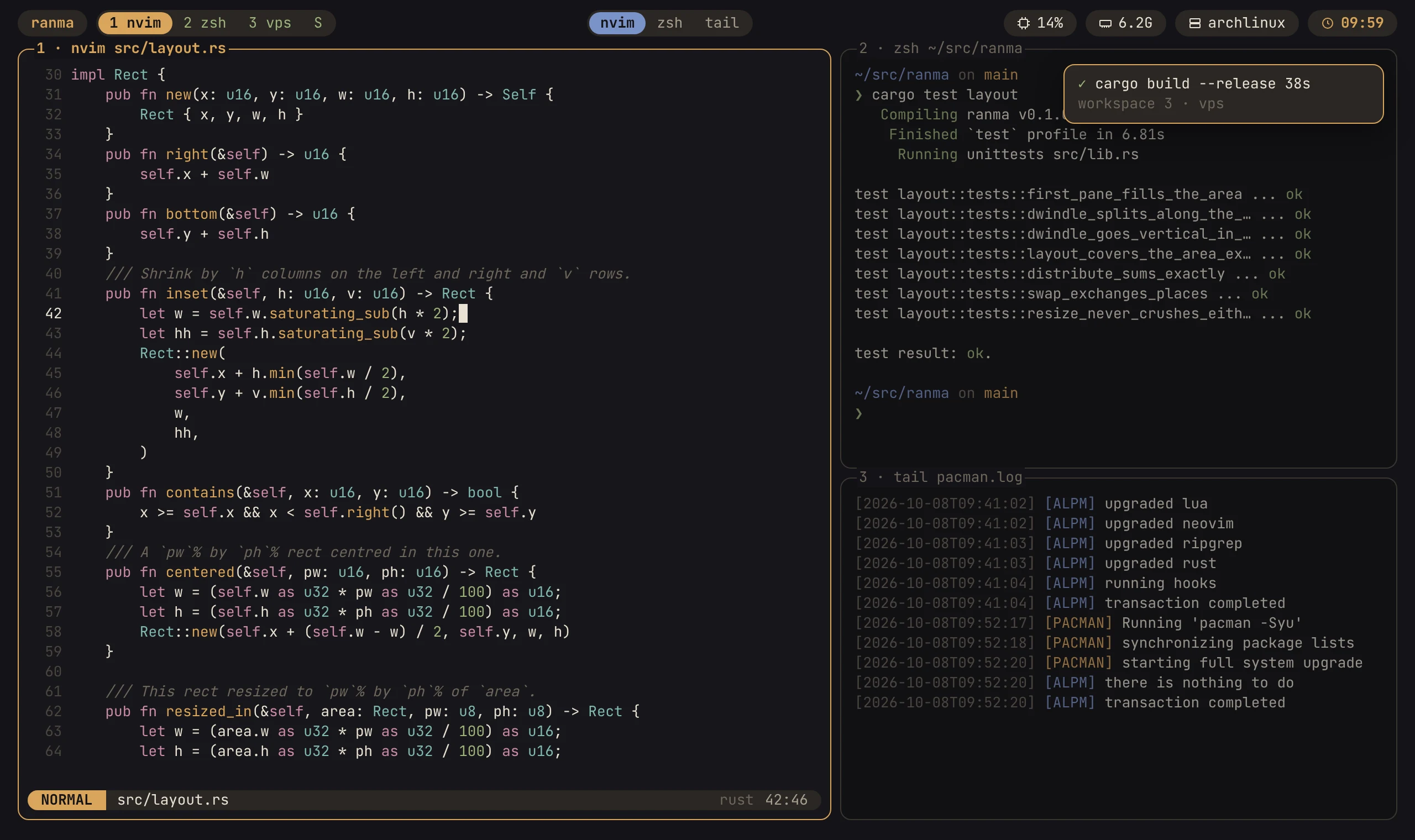
i3's container tree and Hyprland's dwindle placement, where every window is a PTY. Sessions, workspaces, a floating layer and a scratchpad, driven by a leader key and a modal WM mode, configured in Lua and themed in TOML.
欄間
ranma, named for the 欄間: the carved transom panel above sliding doors. A lattice framed in wood, with light coming through it.
❯curl -fsSL https://masshirodev.github.io/ranma/install.sh | sh
Run it again to update. Or apt, dnf, the AUR, Homebrew, Nix, cargo or npm: every channel.
The leader is Ctrl+b, the key tmux uses.
Press it and let go, and ranma enters WM mode: the keys you press now go to ranma instead of the program in the pane. Wait half a second and a panel lists what each key does. Esc leaves it.
The leader is a setting, like everything else: ranma.set { leader = "ctrl+a" }. man ranma-keys lists the rest.
1 · first steps
leader t
open a pane next to the focused one
leader ←↓↑→
move focus (Alt+arrows without the leader)
leader q
close the focused pane
leader 1…0
go to workspace 1-10 (Alt+1…0)
leader w
float the pane, or put it back
leader d
detach: ranma keeps running
leader ?
every key, searchable
leader :
run any action by name
leader p
the settings panel
What it does
A daily driver: every milestone of the roadmap is done. Six panels, the way the README groups them.
1 · tiling
Panes place themselves.
Dwindle splits the focused pane along its longer side, like Hyprland. Or group panes into tabs, float one over the tiling, keep a scratchpad, or lay a workspace out as niri's strip of scrolling columns. Window rules and saved layouts on top.
dwindle
tabbed
floating
scratchpad
scrolling
2 · sessions
Close the terminal. Nothing closes.
ranma runs as a server: closing the terminal, or losing SSH, only detaches, and ranma again picks up where you were. Workspaces and sessions with fuzzy switchers. An upgrade moves running servers to the new build without closing anything.
3 · copy mode
Copy from history, over SSH too.
Copy mode is alacritty's vi mode, with history search. What you yank reaches the system clipboard by OSC 52, from a pane on the far side of an SSH connection as well. Files paste into a pane that runs ssh.
4 · images and keys
The kitty protocols, both of them.
Images draw in panes with the kitty graphics protocol. The kitty keyboard protocol works both ways, so a program asking for exact keys gets them. Outside WM mode bytes pass through raw; a paste is trusted to bracketed paste, not guessed.
5 · the bar
waybar's shape, without waybar's config.
Modules in Lua or shell, left, centre and right. Run ranma inside ranma and the nested ones share the outer bar rather than stack their own. Toasts from ranma notify when a build finishes.
From the screenshot's configuration, below.
6 · mobile
A phone can drive it.
While a phone drives the screen, ranma switches to a mobile view built from scriptable pieces. And it runs on the phone itself, in Termux.
plugins
Plain Lua on the same API as init.lua, in Neovim's layout. hako comes with ranma and installs them; leader L, then B, browses the official list. A plugin that fails while loading is dropped whole; a watchdog stops one that hangs.
Configured in Lua, themed in TOML.
The configuration behind the screenshot, as it is in doc/examples/screenshot. Lua for behaviour, TOML for looks. Both are parsed strictly: a name ranma doesn't know is an error that names it.
ranma.set { theme = "sumi" } -- themes/sumi.toml, beside this file-- The left pill: a fixed label. The built-in `session` module would show the-- session's name, but only once there is more than one session.ranma.module("label", {
render = function()
return { text = "ranma", style = "accent" }
end,
})
⋯ranma.module("cpu", { format = "\u{f4bc} %s" }) -- nf-oct-cpuranma.module("mem", { format = "\u{f035b} %s" }) -- nf-md-memoryranma.module("clock", {
interval = 60,
render = function()
return"\u{f43a} " .. os.date("%H:%M") -- nf-oct-clockend,
})
ranma.bar {
left = { "label", "workspaces" },
center = { "pane_strip" },
right = { "cpu", "mem", "host", "clock" },
}
They are good, and you may want one of them instead. ranma gets where it is mostly by refusing scope, not by out-engineering anyone.
tmux
Use tmux where it is already installed on every machine you touch. ranma keeps its leader, its five preset layouts and the things people style in it, and adds a window manager's tree: dwindle placement, a floating layer, a scratchpad. A tmux shim covers a stated subset for programs that drive tmux; matching tmux feature for feature is a non-goal.
zellij
zellij is a whole workspace with its own interface and WebAssembly plugins. ranma takes its shape from tiling window managers instead: i3's tree, Hyprland's placement, niri's columns. Its plugins are plain Lua on the same API as your init.lua.
tuios
tuios is the model for the feel: a terminal that behaves like a window manager. ranma makes different trade-offs and keeps its scope small:
one process, one copy of each grid, queues bounded by bytes
a server that owns everything, and a client that holds nothing
bytes pass through raw outside WM mode; bracketed paste is trusted, not guessed
what ranma refuses to be
Not reboot-proof.A snapshot brings back sessions, layouts and commands as new processes; the old ones are gone.
Not remote.No remote hosts, SSH or web servers, no clients keeping copies of the layout in step.
No AI in the core.A Lua hook can do that for someone who wants it.
Not native Windows.WSL2 is the Windows story. Not the BSDs yet either.
Not tmux.What it took from tmux it took in its own terms.
DESIGN.md records every decision and what it rules out.
Linux (x86_64, aarch64), macOS (Apple silicon, Intel) and Android in Termux (aarch64), into ~/.local. Run it again to update; it checks the new binary against your config and moves running servers onto it.
❯curl -fsSL https://masshirodev.github.io/ranma/install.sh | sh
Or with a package manager
Every channel ships the same release binary, except cargo install and Nix, which build it.
Arch (AUR)
x86_64, maintained by Rafael Dominiquini
ranma-bin
Homebrew
macOS, Linux
brew install masshirodev/tap/ranma
Nix
or the flake’s packages.<system>.default / overlays.default